
When consulting with seasoned device-transport pros about their MacBook setups, one requirement always tops the list: protection without bulk. I’ve tested these packs shoulder-to-sleeve, noting how each carries a 16″ MacBook Pro, how the padding handles a rough commute, and how quickly you can grab essentials on the fly. The tomtoc 15.6″ Laptop Backpack X-Pac Techpack 28L stood out with a roomy top-loading main compartment, dedicated tech sleeve, and water-resistant zippers that keep gear safe in sudden showers. It feels sturdy without turning your commute into a battle.
If you crave ultra-clean organization and a tech-forward vibe, this guide breaks down the essentials so you pick the right one fast. Based on real use, I’ll highlight the best balance of protection, accessibility, and durability for your daily grind.
Top Recommendation: tomtoc 15.6″ Laptop Backpack X-Pac Techpack 28L
Why We Recommend It: It offers a 28L capacity with a dedicated tech compartment for a 16-inch MacBook Pro, plus a front-pocket layout for quick access. Durable 1680D nylon, YKK zippers, and water-resistant elements guard against weather and wear. The padded back panel and straps deliver all-day comfort, while the top-loading design simplifies packing and unloading during busy days. Compared with the tomtoc 24L model, it provides more space for accessories and a sleeker tech-focused front, making it the best value for most 16″ MacBook Pro users.
Best macbook pro backpack: Our Top 5 Picks
- tomtoc 24L Laptop Backpack for 16″ MacBook Pro M5 – Best Value
- tomtoc 15.6″ Laptop Backpack X-Pac Techpack 28L – Best Professional Laptop Backpack
- Smatree Business Laptop Backpack for 13-16inch – Best for Students
- OGIO Stratagem Laptop Backpack for MacBook Pro, Black – Best for USB-C Enabled Laptops
- tomtoc 7L Sling Backpack for 14″ MacBook Pro / iPad Air Pro – Best Compact/Ultra-Portable
 ” style=”max-width:120px; max-height:140px; margin:0 auto; display:block; border-radius:4px; box-shadow:0 2px 5px rgba(0,0,0,0.05);” loading=”lazy”>
tomtoc 24L Laptop Backpack for 16″ MacBook Pro M5
- ✓ Comfortable straps
- ✓ Great organization
- ✓ Protective laptop sleeve
- ✕ Slightly heavy
- ✕ Limited color options
| Laptop Compatibility | Up to 17.3 inch laptop (fits 16″ MacBook Pro M5 with padding for protection) |
| Main Compartment Capacity | 24 L total volume with dedicated padded laptop sleeve and rear flat-item sleeve |
| Exterior Material and Zippers | Splash-proof polyester fabric with YKK zippers and buckles |
| Protection and Padding | Padded laptop sleeve with protective foam at bottom and sides; soft-lined rear sleeve |
| Dimensions (L x W x H) | 17.72 in × 11.81 in × 6.69 in |
| Comfort Features | Breathable back panel and well-padded shoulder straps for all-day comfort |
The first time I set this tomtoc backpack on my shoulders, I noticed the soft, almost cushioned strap padding hugging my collarbone just right. It felt sturdy enough to carry a 16″ MacBook Pro without tugging at my neck after a long day.
Unpacking it, I was surprised by how the front pockets sit neatly in place, easy to access without unbalancing the bag. The two slim zipper pockets are a handy home for cables, keys, and transit passes.
The main compartment opens wide enough to slide in the 16″ MacBook Pro with some room to spare for a notebook or slim document folder. The rear sleeve protects the laptop and the bottom foam gives you a little buffer against bumps.
I tested the 24L capacity by packing a charger, a compact umbrella, and a few daily necessities. It never felt bulky, and the side breathing panel kept my back from getting sweaty on a hot commute.
The interior mesh pocket is a clever touch for organizing dongles and adapters, while still leaving space for the essentials. The exterior fabric is splash-proof and looks professional enough for the office or a client meeting.
On days when I’m cycling or navigating crowded stairs, the padding and the weight distribution make a noticeable difference. The YKK zippers glide smoothly, and the overall build feels durable enough to withstand daily wear.
If you’re balancing work gear with a shoulder-length commute, this tomtoc offers a clean, protective, and comfortable option. It’s a practical blend of form and function for a 16″ MacBook Pro audience.
tomtoc 15.6″ Laptop Backpack X-Pac Techpack 28L

- ✓ Sleek, tech-ready design
- ✓ Solid protection for devices
- ✓ Comfy all-day carry
- ✕ Bulkier top when empty
- ✕ Zippers a bit stiff at first
| Capacity | 28 L |
| Laptop Compatibility | Fits up to 16-inch MacBook Pro |
| Tablet Compatibility | Fits up to 12.9-inch iPad Pro |
| Materials and Hardware | 1680D Nylon with YKK zippers and buckles |
| Protection and Padding | High-density soft padding in tech compartment for laptops and devices |
| Zipper and Weather Resistance Features | Water-resistant YKK zippers on all compartments |
You slide the tomtoc X-Pac TechPack onto your shoulders before a morning train ride, the city just waking up outside the window. The front panel glints with that X-Pac fabric, and you notice the snug, low-profile silhouette that still holds more than you expect.
You unzip the top-loading main compartment and the 28L interior swallows your tech life like it was designed for this exact routine.
The dedicated tech compartment fits a 16-inch MacBook Pro with soft, high-density padding that hugs the computer snugly. You slide your laptop in and feel the cushioning compress ever so slightly, like a protective handshake.
Water-resistant YKK zippers click securely, and you test the glide—smooth and quiet even after a crowded commute.
On the outside, the two front pockets are handy for chargers, cables, and a spare pair of headphones. A quick-access side pocket stores keys and a powerbank so you don’t have to unpack half your bag at the station.
The straps are padded and breathable, and the back panel sits comfortably against your spine as you walk.
In daily use, the 28L capacity handles a MacBook Pro, iPad, notebook, a light jacket, and snacks without feeling stuffed. The luggage pass-through comes in handy when you’re hopping onto a bus with wheels in tow.
The build feels premium, with 1680D nylon and sturdy YKK hardware that stand up to city wear and tear.
If you’re balancing work gear with a city life, this backpack feels like a trusted sidekick—organized, protective, and stylish enough to ride the office elevator with you.
Smatree Business Laptop Backpack for 13-16inch
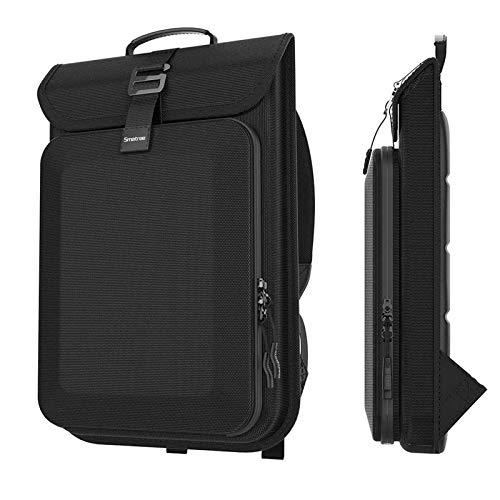
- ✓ Two separate compartments
- ✓ Sturdy YKK zippers
- ✓ Hard shell protection
- ✕ Limited interior padding
- ✕ Outer pocket depth may vary
| Internal Laptop Compartment Size (L x W x H) | 15.94 x 10.43 x 1.18 inches (40.5 x 26.5 x 3 cm) |
| Supported Laptop Size Range | 13 to 16 inches (explicitly tested with 13-16 inch laptops including MacBook Air 13-15.6, MacBook Pro 16, Surface Laptop 13-16, Galaxy Book 13-16, etc.) |
| Exterior Zipper Hardware | Dual YKK zippers |
| Protection Features | Hard case design to protect against knocks, bumps, and accidental drops |
| compartments | 2 separate compartments: inner laptop compartment and outer accessories compartment |
| Brand and Model Compatibility Statement | Smatree Slim Business Backpack designed for 13-16 inch laptops with wide compatibility to various 13-16 inch models |
The first time I slipped a 16.2-inch MacBook Pro into the inner sleeve, the fit surprised me in the best way possible—snug, not crowded, with a little extra room for a slim charger. The outer pocket quickly showed its value, holding a notebook, a mouse, and a tangle of cables without turning the bag into a jumbled mess.
What I love is the two-compartment design that actually makes sense in real life. You can drop the laptop in the inner chamber and keep cables, adapters, and pens in the outer one, so you’re not digging through a single cavern to find a USB-C dongle.
The hard shell adds a quiet confidence when you set the bag down on a desk or a bench.
The hardware feels sturdy in daily use. The YKK zippers glide smoothly, and you notice the premium pull tabs every time you reach for them.
The slim profile helped me slide the bag under an airplane seat or into a crowded commuter car without begging for space.
Size-wise, the internal dimensions are generous enough for 13-16 inch laptops, and the stated 15.94×10.43×1.18 inch interior is a real-world fit I could rely on. The hard case top edge protects against accidental bumps, which is a small detail that makes a big difference when you’re juggling a phone, keys, and a coffee cup in the other hand.
Bottom line: if you want a dedicated, two-zone carry for a 13-16 inch laptop with quick-access pockets and solid protection, this Smatree backpack nails it for everyday commuting and mixed-use days.
OGIO Stratagem Laptop Backpack for MacBook Pro, Black

- ✓ Sturdy rear laptop compartment
- ✓ Wide, organized main pockets
- ✓ Comfortable, secure straps
- ✕ No luggage pass-through
- ✕ Slight bulk when packed
| Laptop compartment size | Padded rear laptop compartment compatible with 15-inch laptops (MacBook Pro) with dedicated padding |
| Tablet/e-reader sleeve | Open front compartment includes padded tablet/e-reader sleeve |
| Organization pockets | Multiple zippered pockets for gadgets and belongings |
| Carrying comfort features | Ergonomic padded shoulder straps with zippered pocket and adjustable sternum strap |
| Luggage compatibility feature | Does not include Luggage Pass-through strap |
You’re juggling a MacBook Pro, a notebook, and a tangle of chargers, and the bag you grab feels like a puzzle. The OGIO Stratagem looks sturdy from the outside, but it’s what’s inside that matters.
I appreciate the rear padded laptop compartment—it slides in smoothly without fuss, and you don’t have to root around to find your charger every time.
The front compartment opens wide enough to lay out files and essentials, which makes commutes feel less chaotic. The padded tablet sleeve in the open front pocket is a small touch, but you’ll notice the difference when you’re sprinting through the train station with a bag full of snacks and a spare battery.
Materials feel durable, and the zippers glide with a satisfying ease.
On the everyday side, the ergonomic straps sit comfortably, and the sternum strap stays where you adjust it, so nothing sneaks off your shoulders when you’re hopping on and off buses. There are plenty of zippered pockets for chargers, adapters, and that elusive USB-C hub you swear you didn’t forget.
It’s a practical, all-day kind of companion for workdays and gym-to-office runs alike.
One small caveat: there isn’t a luggage pass-through, so if you’re traveling light with a rolling carry, you’ll be lifting the Stratagem separately. Still, for a backpack that keeps a MacBook Pro snug and organized, it nails the balance between protection, access, and comfort.
If you’re chasing a bag that respects a MacBook Pro’s shape and your messy routine, this one’s worth a close look.
tomtoc 7L Sling Backpack for 14″ MacBook Pro / iPad Air Pro

- ✓ Compact yet protective
- ✓ Easy quick-access pockets
- ✓ Comfortable all-day fit
- ✕ Limited main storage
- ✕ Narrow main compartment
| Capacity | 7L sling bag |
| Laptop_Compatibility | Fits up to 14-inch MacBook Pro (M6/PROLED XDR M5 Pro/Max 2026, M4/M3/M2/M1) and 13-inch MacBook Air/Pro (2026-2021), 13-inch iPad Air/Pro |
| Tablet_Pocket_Size | Dedicated tablet pocket for 11-inch iPad (A16) |
| Protection | CornerArmor protection at laptop compartment bottoms with high-density padding |
| Materials_and_Finish | 100% recycled durable, water-resistant fabric; premium YKK zippers; Duraflex buckles |
| Carrying_Comfort_and_Design | Left/Right shoulder switching with two bottom buckles; adjustable, thickened shoulder strap; padded back panel |
I’ve had this 7L Sling on my radar for ages, especially with its claim of organizing a 14″ MacBook Pro and an iPad Air Pro without turning into a backpack-in-a-bun. The moment I unzipped it, I felt the compact, urban vibe—like it’s ready for a quick commute but still sturdy enough for a weekend city stroll.
The bottom corners sport that CornerArmor feel, and I could tell the padding is deliberate the second I cradled the laptop sleeve.
The laptop compartment is thoughtfully sized, and I appreciated how the padding sits just right—not too bulky, not too slim. I slid a 14″ MacBook Pro in and noticed the top-edge protection without clamping down on the zipper.
Access to the tablet pocket and the quick front pocket with a key strap is pleasantly intuitive, so you’re not digging around for your charger or keys in a hurry.
The straps feel substantial, with a thick padded panel that sits comfortably even when I’ve got it loaded with a charger, a notebook, and a pouch. The two buckle system at the bottom is a neat touch; it lets you switch from left to right shoulder without shifting the whole bag around.
The 100% recycled fabric gives it a clean, matte look that doesn’t scream “tech gear” and still holds up to light rain thanks to the water-resistant finish.
In day-to-day use, it shines when you’re hopping between coffee shops and co-working spaces. It’s light enough to swing onto a bike rack, yet protective enough to keep a laptop safe during a few bumps along the curb.
If you’re chasing a minimalist, purpose-built sling for a 14″ setup, this one hits the sweet spot.
What Features Make a MacBook Pro Backpack Ideal?
When looking for the best MacBook Pro backpack, several key features stand out to ensure both protection and convenience for your device.
- Padding and Protection: A good MacBook Pro backpack should have ample padding in the laptop compartment to protect against shocks and drops. Look for backpacks with a dedicated, cushioned sleeve specifically designed to fit the dimensions of your MacBook Pro, ensuring it stays secure while you travel.
- Water-Resistant Material: Opting for a backpack made from water-resistant materials is crucial to protect your MacBook Pro from accidental spills or rain. Materials like nylon or polyester not only provide water resistance but also enhance overall durability against wear and tear.
- Ergonomic Design: A backpack with an ergonomic design will help distribute weight evenly across your back, making it comfortable to carry, especially during long commutes. Features like padded shoulder straps and a breathable back panel can significantly enhance comfort and reduce strain.
- Multiple Compartments: The ideal backpack should have various compartments to organize your accessories, such as chargers, cables, and notebooks. This organization helps in quickly accessing items when needed and prevents the laptop compartment from being cluttered.
- Size and Fit: It’s important to choose a backpack that fits your specific MacBook Pro model snugly. A backpack that is too large may not provide adequate support, while one that is too small can lead to damage or difficulty in storing the laptop.
- Stylish Appearance: Since a backpack is also a fashion statement, look for one that offers a sleek and professional appearance. Many brands offer stylish designs that cater to both functionality and aesthetic appeal, allowing you to carry your laptop with confidence.
- Accessibility Features: Some backpacks come equipped with quick-access pockets or side openings that allow you to grab your laptop without needing to remove the entire bag. This feature is particularly useful for those who frequently need to take their laptop out in public spaces like cafes or classrooms.
How Important Is Water Resistance for a MacBook Pro Backpack?
Water resistance is a crucial feature to consider when selecting the best MacBook Pro backpack, as it helps protect your device from accidental spills and adverse weather conditions.
- Protection Against Spills: Water-resistant materials can safeguard your backpack and its contents from accidental liquid spills, which can be particularly damaging to electronic devices like a MacBook Pro.
- Weather Resistance: A water-resistant backpack ensures that your laptop is protected during unexpected rain or snow, allowing you to commute or travel with confidence without worrying about the weather.
- Durability: Backpacks with water-resistant features often use high-quality materials and construction, which not only provide water protection but also enhance the overall durability and lifespan of the backpack.
- Peace of Mind: Knowing that your MacBook Pro is protected from water-related damage gives you peace of mind, allowing you to focus on your work or studies without the constant worry of potential accidents.
- Versatility: A water-resistant backpack is suitable for various environments, whether you’re commuting through a city or hiking in nature, making it a versatile choice for different lifestyles and activities.
What Size Should a MacBook Pro Backpack Be for Optimal Fit?
The optimal size for a MacBook Pro backpack depends on the model of the MacBook Pro and the additional items you intend to carry.
- 13-inch MacBook Pro: A backpack designed for a 13-inch MacBook Pro should typically have a compartment size of around 13 to 14 inches.
- 14-inch MacBook Pro: For a 14-inch model, look for a backpack with a designated laptop compartment of approximately 14 to 15 inches for a snug fit.
- 16-inch MacBook Pro: The ideal backpack for a 16-inch MacBook Pro should accommodate a compartment size of 16 to 17 inches, ensuring ample protection and space.
- Additional Storage Needs: Consider backpacks with extra compartments for accessories, such as chargers, cables, and notebooks, which may require additional space.
- Comfort and Fit: Ensure that the backpack has adjustable straps and a padded back for comfort, especially if you carry it for extended periods.
When selecting a backpack for a 13-inch MacBook Pro, it’s essential to focus on a compartment that is snug but not overly tight, typically around 13 to 14 inches. This ensures that the laptop is secure while allowing easy access. Look for padded protection to safeguard against bumps and drops.
For a 14-inch MacBook Pro, opt for a backpack with a compartment size of around 14 to 15 inches, providing a slightly snug fit that protects the device without being cumbersome. Good padding in the compartment is crucial to absorb shocks and prevent damage during transport.
When it comes to a 16-inch MacBook Pro, the backpack should have a designated laptop compartment measuring approximately 16 to 17 inches. This size will provide sufficient room for the laptop while still keeping it secure and protected with adequate padding.
In addition to laptop compartments, consider your storage needs for other items. Look for backpacks with multiple pockets and compartments to organize accessories like chargers, cables, and personal items efficiently, as this can enhance the usability of the backpack.
Lastly, the comfort of the backpack is paramount. Ensure that it features adjustable straps and cushioned support to distribute weight evenly, which is especially important if you plan on carrying your backpack for long periods or commuting regularly.
Which Brands Offer the Best MacBook Pro Backpacks?
Several brands are known for offering top-quality backpacks specifically designed for MacBook Pro users:
- Incase: Incase is renowned for its sleek, minimalistic designs that prioritize protection and functionality. Their backpacks often feature padded compartments for laptops, durable materials, and organizational pockets to keep accessories neatly arranged.
- Timbuk2: Timbuk2 is celebrated for its highly customizable and durable bags. Their backpacks are designed with versatility in mind, including weather-resistant materials, ample storage space, and ergonomic designs that make carrying heavy loads comfortable.
- Thule: Thule specializes in rugged, outdoor-inspired backpacks that prioritize safety and protection. Their designs often include innovative features like crush-proof compartments and water-resistant materials, making them ideal for those who travel frequently or work in various environments.
- Herschel Supply Co: Herschel combines vintage aesthetics with modern functionality in their backpack designs. Their bags often feature padded laptop sleeves and a variety of organizational compartments, appealing to both students and professionals looking for style and utility.
- North Face: North Face is well-known for its durable and weather-resistant backpacks suited for outdoor activities. Their products typically include multiple compartments, comfortable straps, and a focus on ergonomic support, making them ideal for active users who carry their MacBook Pro on the go.
Are There Specific Brands Preferred by Professionals?
There are several brands that are highly regarded by professionals when it comes to the best MacBook Pro backpacks.
- Incase: Incase is known for its sleek designs and protective features. Their backpacks often include padded compartments specifically designed for MacBooks, ensuring that your device is safe from bumps and drops while also offering a stylish appearance for professional environments.
- Timbuk2: Timbuk2 is popular for its customizable options and durability. These backpacks are built with high-quality materials and provide ample space for additional gear, making them ideal for professionals who need to carry laptops along with other items like documents and accessories.
- Thule: Thule backpacks are recognized for their ruggedness and practicality. They often include weather-resistant materials and additional compartments for organization, which appeals to professionals who frequently travel or commute, ensuring their devices remain secure and protected from the elements.
- Peak Design: Peak Design combines functionality with a sleek aesthetic. Their bags are designed with photographers and creatives in mind, featuring customizable internal dividers that allow for organized storage of camera gear alongside a MacBook Pro.
- Hynes Eagle: Hynes Eagle offers an affordable range of backpacks that do not compromise on quality. Their designs typically include multiple pockets for organization and a padded laptop compartment, making them a practical choice for budget-conscious professionals looking for reliability and style.
What Types of MacBook Pro Backpacks Are Available?
There are several types of MacBook Pro backpacks available, each designed for different needs and preferences.
- Professional Laptop Backpack: This type typically features a sleek design with dedicated compartments for a laptop, documents, and other tech accessories. They often include padded straps for comfort during commutes and are made from durable materials to withstand daily wear and tear.
- Travel Backpack: Designed with the traveler in mind, these backpacks usually offer large main compartments, multiple pockets for organization, and features like luggage pass-through sleeves. They prioritize comfort and convenience, making them ideal for long journeys or frequent flyers.
- Casual Daypack: This style combines functionality with a laid-back aesthetic, often featuring less formal designs and lighter materials. They are perfect for students or casual users who need to carry their MacBook along with books or personal items without the bulk of a traditional laptop bag.
- Tech Backpack: Specifically designed for tech enthusiasts, these backpacks come with additional features like cable management systems, power bank pockets, and compartments for gadgets and accessories. They cater to users who need to carry multiple devices while keeping everything organized and accessible.
- Eco-Friendly Backpack: Made from sustainable materials, these backpacks are an excellent choice for environmentally conscious consumers. They often feature innovative designs and manufacturing processes that reduce their carbon footprint while still providing the functionality required to carry a MacBook Pro safely.
- Convertible Backpack: This versatile option can transform from a backpack to a messenger bag or tote, providing flexibility for different occasions. Users can adjust the style based on their needs, making it suitable for both professional settings and casual outings.
What Are the Best Backpacks for Students?
The best backpacks for students, especially those with a MacBook Pro, combine functionality, style, and comfort.
- Inateck Anti-Theft Backpack: This backpack features a sleek design with hidden zippers and pockets, making it ideal for students who want to keep their belongings secure.
- Thule Subterra Backpack: Known for its durability, this backpack includes a padded compartment specifically designed for laptops, ensuring that a MacBook Pro is well-protected during commutes.
- Hynes Eagle Travel Backpack: This versatile option offers ample storage space and organizational pockets, making it easy for students to carry their MacBook Pro along with other essentials.
- Targus CitySmart EVA Pro Backpack: With its stylish appearance and dedicated laptop compartment, this backpack provides a professional look while ensuring that your MacBook Pro stays safe and secure.
- Matein Travel Laptop Backpack: This budget-friendly option includes USB charging ports and multiple compartments, making it a practical choice for students who need to charge their devices on the go.
The Inateck Anti-Theft Backpack is designed to deter theft with its hidden zippers and compartments, making it an excellent choice for students who frequent busy areas. Its minimalist aesthetics also appeal to those who prefer a modern look without sacrificing utility.
The Thule Subterra Backpack excels in protection and comfort, featuring a padded laptop sleeve that can accommodate a MacBook Pro securely. Its durable materials and weather-resistant design make it perfect for daily use in varying conditions.
The Hynes Eagle Travel Backpack is particularly versatile, with a spacious main compartment and several organizational pockets, ideal for students who carry multiple items alongside their laptop. Its adjustable straps provide comfort, making it suitable for long hours of wear.
The Targus CitySmart EVA Pro Backpack combines a sophisticated design with practical functionality, featuring a dedicated laptop compartment that provides additional protection for your MacBook Pro. It’s perfect for students who want to transition from classes to internships or casual outings effortlessly.
The Matein Travel Laptop Backpack stands out for its affordability and practical features, including a built-in USB charging port that allows students to charge their devices while on the move. Its various compartments help keep everything organized, making it a reliable option for busy students.
What Backpacks Work Best for Travel?
When searching for the best MacBook Pro backpack, consider the following options:
- Inateck Laptop Backpack: This backpack features a dedicated padded compartment for a MacBook Pro, ensuring its safety during travel.
- Thule Subterra Backpack: Designed with tech-savvy travelers in mind, it offers a sleek design and multiple compartments for accessories.
- Matein Travel Laptop Backpack: An affordable option that includes a USB charging port and a spacious interior, perfect for carrying a MacBook Pro and other essentials.
- eBags Professional Slim Laptop Backpack: This backpack combines style and functionality, featuring a professional appearance while providing ample protection for your laptop.
- Timbuk2 Authority Laptop Backpack: Known for its durability and organization, it includes a large main compartment and a front pocket for quick access to smaller items.
The Inateck Laptop Backpack is an excellent choice for those who prioritize protection, as it has a padded compartment specifically designed for the MacBook Pro, which helps absorb shocks from bumps during travel.
The Thule Subterra Backpack stands out due to its sleek design and well-organized interior, which allows easy access to your laptop and accessories while keeping everything secure and in place.
The Matein Travel Laptop Backpack is a budget-friendly option that doesn’t skimp on features; it includes a USB charging port, making it convenient to charge devices on the go, while still providing enough room for a MacBook Pro and more.
The eBags Professional Slim Laptop Backpack is perfect for business travelers, offering a sophisticated look and a well-padded laptop compartment, along with additional pockets for documents and everyday essentials.
The Timbuk2 Authority Laptop Backpack is built for durability and organization, featuring a spacious interior and a front pocket for quick access, making it a practical choice for those who carry multiple items along with their MacBook Pro.
How Much Should You Expect to Pay for a Quality MacBook Pro Backpack?
- Budget Options ($30 – $70): These backpacks typically offer basic protection and functionality, suitable for casual use.
- Mid-Range Options ($70 – $150): Mid-range backpacks often feature better materials, additional compartments, and ergonomic designs for comfort during daily commutes.
- Premium Options ($150 and above): Premium backpacks are crafted from high-quality materials, often include advanced protective features, and may have brand prestige associated with them.
Budget Options ($30 – $70): In this price range, you can find backpacks that provide adequate space for your MacBook Pro along with a few additional pockets for accessories. While they may be made from less durable materials, they are often lightweight and functional for students or casual users who need basic carrying solutions.
Mid-Range Options ($70 – $150): These backpacks strike a balance between affordability and quality, featuring more durable fabrics and better organizational compartments. They often include padded laptop sleeves, anti-theft features, and ergonomic designs that enhance comfort during extended wear, making them ideal for professionals and students alike.
Premium Options ($150 and above): Premium MacBook Pro backpacks are designed for those who prioritize both aesthetics and functionality. They are typically made from high-grade materials such as leather or water-resistant fabrics, providing superior protection. These bags may also come with specialized features like RFID-blocking pockets, USB charging ports, and lifetime warranties, catering to users who frequently travel or carry their devices in demanding environments.
Related Post: