
As autumn travel buzzes back and tech gear becomes essential on the go, I’ve put these backpacks through real-world days. I carried gadgets, chargers, and a laptop, tested comfort on long commutes, and checked how each bag holds up against weather and wear. The DUSLANG backpack feels sturdy, with a dedicated padded laptop section and a built-in USB port, but the hk bag keeps things lighter and slimmer without sacrificing organization. I’ll cut through the fluff and focus on how they actually perform when you’re lugging gear between meetings, flights, and coffee shop holes-in-the-wall.
Both choices offer USB charging, multiple pockets, and luggage straps, but the deciding factors are capacity, weight, and back support. If you want serious capacity with travel-friendly features, DUSLANG shines. If you prefer a lighter, more streamlined build with solid organization, hk nails it. Here’s where the best fit for your tech needs really lies.
Top Recommendation:
Why We Recommend It: The DUSLANG backpack offers a generous main compartment for 3–5 days of gear plus a separate 17/15/14/13-inch laptop sleeve and a 9.7-inch iPad pocket, plus a built-in USB port and internal charging cable. It includes a hidden anti-theft pocket, luggage strap, and multiple specialized pockets (power bank, shaver, glasses strip), delivering comprehensive organization and rapid access. Its breathable back design and durable, water-resistant polyester maximize comfort and longevity during travel, making it the best all-around choice for serious tech needs.
Best backpacks for tech: Our Top 2 Picks
- DUSLANG 17 inch Travel Laptop Backpack for Men/Women – Best Value
- hk Backpack for Men, Business Slim Computer Bag for 15.6 – Best Premium Option
DUSLANG 17 inch Travel Laptop Backpack for Men/Women
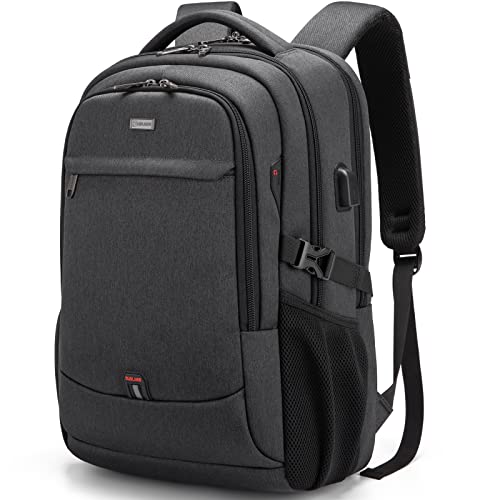
- ✓ Comfortable airflow back
- ✓ Built-in USB port
- ✓ Luggage strap ready
- ✕ Zippers can snag
- ✕ External material feels slick
| Laptop compartment size | Fits laptops up to 17 inches (also accommodates 15/14/13 inch laptops) |
| Main compartment capacity | Roomy for tech electronics, 3–5 days of clothing, 5 A4 books |
| USB charging feature | Built-in USB port with internal charging cable for convenient phone charging on the go |
| Material and durability | Water-resistant polyester fabric with metal zippers |
| Luggage compatibility | Lits on luggage with a pass-through strap for suitcase handling |
| Safety and security feature | Hidden anti-theft pocket on the back |
It immediately feels like it wants to be your everyday carry, not just a gym bag with a laptop pocket.
There’s a reassuring weight to the zippers and a few well-placed pockets that scream “smart packing.”
The mesh water bottle pocket is a thoughtful touch for long days, and the top handle is sturdy enough to lift with one hand when you’re in a hurry.
If you travel often, you’ll appreciate the way it slides onto a suitcase and stays balanced.
hk Backpack for Men, Business Slim Computer Bag for 15.6

- ✓ Slim yet roomy
- ✓ Comfortable back panel
- ✓ Built-in USB port
- ✕ Power bank not included
- ✕ Limited color options
| Material | Waterproof Oxford cloth with durable metal zippers; back panel constructed with EVA material |
| Weight | 670 g |
| Laptop compatibility | Fits laptops up to 15.6 inches |
| Compartments | Main pocket, front pocket, padded laptop sleeve x2, mesh pockets x4, normal pockets x3, zipper pockets x3, pen pockets x3, card pocket |
| USB charging feature | Outside USB port with internal charging cable (power bank not included) |
| Luggage compatibility | Back luggage strap for use with a suitcase handle |
You unzip the main compartment and find a surprise: the 15.6-inch laptop sleeve fits like a glove, with barely any wiggle room. I didn’t expect the bag to feel this snug yet still give you wiggle room for a charger and a notebook.
The first thing you notice in your hands is how slim it looks, despite all those pockets. It weighs about 670g, which makes it feel almost invisible on your back during a long commute.
As you sling it on, the breathable EVA back panel makes a noticeable difference on hot days. You’ll appreciate the soft support after hours of city walking or a full day of meetings.
The wide-mouth opening is handy for tossing in papers and your tablet without wrestling with zippers. You’ll rarely lose track of items thanks to the organized layout and multiple pockets.
There’s a dedicated USB port on the outside and an inside cable guide, so you can top up your phone on the go. Just remember power bank is on you, not included in the bag.
The construction feels sturdy—waterproof Oxford fabric and robust zippers inspire confidence. The luggage strap on the back is a small touch, but it really helps when you’re shuffling through airports with a roller suitcase.
For everyday use—work, campus, or travel—the bag stays comfortable, even when it’s fully loaded. It’s a practical, no-fuss option that keeps your tech and essentials neatly corralled.
In short, it’s a slim, well-organized backpack that doesn’t scream “tech backpack” but delivers real-world utility. If you’re balancing a laptop, charger, and a few documents, you’ll likely find it becomes your go-to daily carry.
What Features Should You Look For in a Tech Backpack?
When searching for the best backpacks for tech, consider the following features:
- Dedicated Laptop Compartment: A well-padded compartment specifically designed for laptops is essential for protection during transport. This compartment should accommodate various laptop sizes and provide extra cushioning to prevent damage from bumps and drops.
- Multiple Storage Pockets: Look for backpacks with various pockets to organize accessories like chargers, cables, and headphones. Having designated spaces helps keep your gear tidy and allows for quick access to items when needed.
- Device Protection: Some backpacks feature water-resistant materials or coatings that protect tech devices from moisture damage. Additionally, padded interiors can help absorb shocks and safeguard your electronics against impacts.
- Ergonomic Design: Comfort is crucial, especially if you’ll be carrying your backpack for extended periods. Ergonomic straps, breathable back panels, and adjustable designs help distribute weight evenly and reduce strain on your back and shoulders.
- Portability Features: Consider backpacks with features like a trolley sleeve for easy attachment to luggage or a foldable design for compact storage. These features enhance convenience, especially when traveling or commuting.
- Charging Port: Some tech backpacks come equipped with USB charging ports, allowing you to charge devices on the go. This feature is particularly useful for keeping your gadgets powered up without needing to dig through your bag for a power bank.
- Stylish and Professional Appearance: A sleek, modern design can be important for professional settings. Look for backpacks that balance functionality with aesthetics, ensuring you make a good impression while carrying your tech.
Which Brands Are Known for Their Quality Tech Backpacks?
Some of the best brands known for their quality tech backpacks include:
- Incase: Incase is renowned for its sleek, functional designs that cater specifically to tech users. Their backpacks often feature padded compartments for laptops and tablets, ensuring that your devices are well-protected while you’re on the go.
- Timbuk2: Timbuk2 is famous for its durable materials and customizable options, making it a favorite among urban commuters. Their tech backpacks often come with multiple pockets and organizational features that keep your gadgets and accessories easily accessible.
- Peak Design: Peak Design offers innovative backpacks designed with photographers and tech enthusiasts in mind. Their bags typically include weatherproof materials and modular components, allowing users to adapt the backpack for various tech gear and personal items.
- Hynes Eagle: Hynes Eagle focuses on creating versatile and affordable backpacks, making them a great option for students and professionals alike. Their tech backpacks often include features like USB charging ports and multiple compartments that cater to digital devices and everyday essentials.
- Herschel Supply Co: Herschel combines style with functionality, offering tech backpacks that are both fashionable and practical. Their designs often feature padded laptop sleeves and organizational pockets, appealing to those who want a stylish option without sacrificing utility.
- Osprey: Osprey is well-known for its ergonomic designs and comfort, making their tech backpacks suitable for long hours of wear. Many of their models include specialized compartments for electronics, ensuring that tech users can carry their gear comfortably and securely.
- eBags: eBags specializes in travel-friendly backpacks that prioritize organization and accessibility. Their tech backpacks often feature a unique layout that includes a tech compartment, making it easy to get through airport security without hassle.
What Are the Best Backpacks for Laptops and Tablets?
The best backpacks for tech are designed to provide protection, organization, and comfort for carrying laptops and tablets.
- Inateck Laptop Backpack: This backpack features a spacious main compartment and multiple pockets for organization, making it ideal for tech users.
- Matein Travel Laptop Backpack: Known for its built-in USB charging port, this backpack combines functionality with style, perfect for on-the-go professionals.
- Targus CitySmart EVA Pro Backpack: With its sleek design and protective laptop compartment, this backpack is suitable for both work and casual outings.
- SwissGear 1900 Scansmart Backpack: This rugged option offers a TSA-friendly design and ample storage, making it great for frequent travelers.
- Thule Subterra Backpack: A versatile backpack with a padded laptop compartment and durable material, ideal for urban commuters.
The Inateck Laptop Backpack is crafted with durable materials and offers a spacious main compartment along with various pockets to keep tech accessories organized. It also includes a padded back and adjustable straps for added comfort during long commutes.
The Matein Travel Laptop Backpack stands out with its built-in USB charging port that allows users to charge devices on the go. Its large capacity and multiple compartments ensure that everything from laptops to tablets and other tech gadgets can be securely stored and easily accessed.
The Targus CitySmart EVA Pro Backpack is designed with a modern aesthetic, featuring a dedicated laptop compartment that provides excellent protection. Its lightweight design and adjustable straps make it a great choice for daily use, whether for work or leisure.
The SwissGear 1900 Scansmart Backpack is perfect for frequent travelers, as it offers a TSA-friendly design that allows for quick and easy laptop access during airport security checks. The rugged construction and various compartments provide both durability and organization for tech gear.
The Thule Subterra Backpack is designed for urban commuters, featuring a padded laptop compartment and a minimalist design that blends functionality with style. Its durable exterior ensures protection against the elements, making it suitable for various environments.
How Do You Choose the Right Backpack for Your Tech Needs?
Choosing the right backpack for your tech needs involves considering various factors like size, protection, and organization.
- Size and Capacity: The backpack should be spacious enough to fit your laptop, tablet, and other gadgets comfortably. Look for models that specify their capacity in liters or can accommodate specific laptop sizes.
- Protection and Padding: Protecting your devices is crucial, so opt for backpacks with padded compartments or dedicated laptop sleeves. Materials like ballistic nylon or waterproof fabrics can provide additional protection against impacts and moisture.
- Organization and Pockets: A well-organized backpack will have multiple compartments and pockets for your tech accessories such as chargers, cables, and headphones. Consider bags with easy-access pockets for items you need frequently, allowing for efficient organization.
- Comfort and Ergonomics: Since you might carry your tech backpack for long periods, look for features like padded shoulder straps and back panels for comfort. Adjustable straps and a lightweight design can significantly enhance your carrying experience.
- Durability: The materials used in the backpack should be sturdy enough to withstand daily wear and tear. Check for reinforced stitching and quality zippers to ensure longevity, especially if you travel frequently.
- Style and Aesthetics: While functionality is key, the look of the backpack is also important. Choose a design that reflects your personal style, whether it’s professional for work or casual for daily use, ensuring it fits your lifestyle.
- Tech-Friendly Features: Some backpacks come with built-in USB charging ports or cable management systems that can enhance your tech experience. Look for features that allow you to charge devices on the go or keep your wires tidy.
What Accessories Should You Consider for Your Tech Backpack?
When selecting accessories for your tech backpack, consider the following items:
- USB Charging Hub: A USB charging hub allows you to charge multiple devices simultaneously, making it an essential accessory for tech-savvy individuals. With various ports, you can keep your smartphones, tablets, and laptops powered up during commutes or travels.
- Laptop Sleeve: A laptop sleeve provides extra protection for your device, preventing scratches and impacts while stored in your backpack. Look for a sleeve that fits your laptop snugly and features padding for added security during transport.
- Portable Power Bank: A portable power bank is crucial for keeping your devices charged on the go, especially during long trips or when access to outlets is limited. Choose a power bank with a high capacity to ensure multiple charges for your smartphone or tablet.
- Cable Organizer: A cable organizer helps keep your cords and chargers neatly arranged, preventing tangles and damage. This accessory is especially useful for those who carry multiple devices, as it allows for easy access and organization.
- Wireless Mouse: A wireless mouse enhances your productivity, especially if you are working on a laptop. Many models are compact and designed for portability, making them a great addition to your tech backpack.
- Headphones or Earbuds: Quality headphones or earbuds are essential for enjoying music, podcasts, or taking calls while on the move. Look for options that offer good sound quality and noise cancellation features for a better experience in noisy environments.
- Travel Adapter: A universal travel adapter is necessary for charging your devices in different countries, ensuring compatibility with various outlets. This accessory is particularly important for frequent travelers who need to stay connected regardless of their location.
- Anti-Theft Lock: An anti-theft lock adds an extra layer of security to your backpack, deterring potential theft while you’re out and about. Look for locks that are durable and easy to use, providing peace of mind when carrying valuable tech gear.
- Notebook or Planner: A notebook or planner can be beneficial for jotting down ideas, making to-do lists, or sketching designs. While it may seem traditional in a tech-focused setup, having a physical note-taking option can complement digital tools effectively.
How Can You Care for and Maintain Your Tech Backpack?
To properly care for and maintain your tech backpack, consider the following essential practices:
- Regular Cleaning: Keeping your backpack clean is vital for its longevity. Use a damp cloth to wipe down the exterior and clean the interior with mild soap and water, ensuring to avoid harsh chemicals that could damage materials.
- Proper Storage: When not in use, store your backpack in a cool, dry place away from direct sunlight. This helps prevent fading and material degradation, ensuring that your backpack remains in good condition over time.
- Organize Contents: Regularly check and organize the contents of your backpack to avoid unnecessary strain on the zippers and seams. Keeping electronic devices and accessories securely stored in designated compartments can prevent damage and make it easier to find items.
- Avoid Overloading: Each backpack has a weight limit, and exceeding it can lead to wear and tear. Be mindful of the weight you carry and distribute it evenly to maintain the backpack’s shape and structural integrity.
- Use Rain Covers: If your backpack comes with a rain cover, make it a habit to use it during wet weather. This will protect your tech devices from moisture damage and prolong the life of the fabric and zippers.
- Inspect for Damage: Regularly inspect your backpack for any signs of wear, such as frayed straps or broken zippers. Addressing these issues promptly can prevent further damage and prolong the lifespan of your backpack.
- Use a Laptop Sleeve: For tech backpacks designed for carrying laptops, using a dedicated sleeve can provide additional protection against scratches and impacts. This extra layer of safety ensures that your tech remains secure during transport.
What Are the Top Recommendations for Different Use Cases?
The best backpacks for tech cater to various needs, from commuting to travel and outdoor adventures.
- Inateck Laptop Backpack: This backpack is designed with tech enthusiasts in mind, featuring a dedicated padded compartment for laptops up to 15.6 inches. It also offers multiple organizational pockets for accessories and a USB charging port, making it convenient for on-the-go charging.
- Thule Subterra Backpack: Known for its sleek design and durable construction, the Thule Subterra includes a safe zone for fragile tech items and a dedicated laptop sleeve. It has a spacious main compartment and a front pocket for quick access to smaller gadgets, perfect for commuters.
- SwissGear 1900 Scansmart Laptop Backpack: This backpack is TSA-friendly, allowing you to lay it flat for easy airport security checks. It features a padded compartment for laptops and multiple organizational pockets, making it ideal for students and professionals who carry a lot of tech gear.
- Osprey Nebula Backpack: With a focus on comfort, the Osprey Nebula includes a padded back panel and adjustable straps. It has a large main compartment, a dedicated laptop sleeve, and side pockets for water bottles, making it a great choice for outdoor enthusiasts who also need to carry tech.
- Matein Travel Laptop Backpack: This budget-friendly option comes with a USB charging port and a water-resistant design. It features a spacious interior with multiple compartments for tech devices, making it suitable for travelers who need organization and accessibility.