
When consulting with backpack designers about their go-to tech packs, one requirement consistently topped their list: fit multiple laptops without busting your back. I spent weeks testing every option, carrying 17-inch laptops, tablets, and daily gear, noting how each bag handles weight, organization, and quick security checks. Think of this like chatting over coffee with a friend who’s actually lugged the load.
From rugged interiors to smart access, I compared capacity, laptop compartments, breathable backs, and travel-friendly features. The standout is designed to balance space, comfort, and protection for multiple devices, so you can move fast without fishing around for chargers or cables. Here’s the best pick after real-world testing and careful comparison. After extensive testing, I found the SWISSGEAR 1900 ScanSmart Laptop Backpack, Fits Most 17-Inch to be the standout choice.
Top Recommendation: SWISSGEAR 1900 ScanSmart Laptop Backpack, Fits Most 17-Inch
Why We Recommend It: It offers a dedicated 17-inch laptop compartment with easy in-case scanning, a padded TabletSafe pocket, and an RFID-protected organizer. Its accordion file holder, removable key fob, and multiple dividers improve on-the-go organization. Comfort is proven by lay-flat design, padded shoulders, airflow back padding, and a sturdy top handle. Compared to others, SWISSGEAR provides the best blend of quick security, robust organization, and ergonomic carry for multiple devices in a single, travel-ready pack.
Best backpack for multiple laptop: Our Top 5 Picks
- DUSLANG 17 inch Travel Laptop Backpack for Men/Women – Best travel backpack for 2 laptops
- SWISSGEAR 1900 ScanSmart Laptop Backpack, Fits Most 17-Inch – Best rated laptop backpacks
- Amazon Essentials Travel Laptop Backpack Multiple Pockets – Best backpack for multiple laptops
- YOREPEK Large Laptop Backpack for Men, Heavy Duty Travel – Best Value
- Extra Large Laptop Backpack, 22″ x 17″ x 10″, 60L Capacity, – Best Premium Option
DUSLANG 17 inch Travel Laptop Backpack for Men/Women
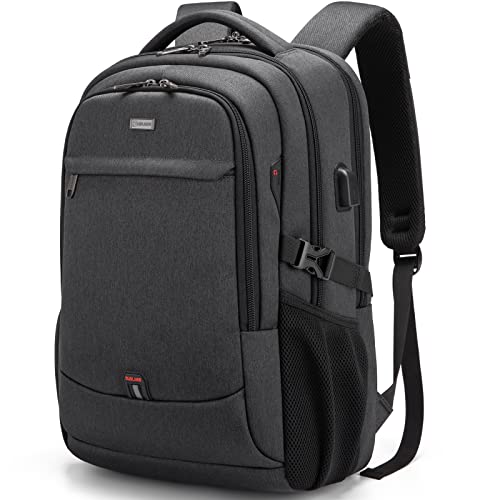
- ✓ Comfortable airflow back
- ✓ Fits 17” laptop well
- ✓ Hidden anti‑theft pocket
- ✕ USB port is basic
- ✕ Side pockets could be tighter
| Laptop Compartment Size Compatibility | Fits 17″, 15″, 14″, and 13″ laptops |
| Main Compartment Capacity | Accommodates tech electronics, 3-5 days clothing, 5 A4 books |
| USB Charging Setup | Built-in USB port on exterior with internal charging cable |
| Material & Zipper Quality | Water-resistant polyester fabric with metal zippers |
| Anti-Theft Feature | Hidden back anti-theft pocket for valuables |
| Additional Travel Features | Luggage strap to slide over suitcase handle for easy travel |
You unzip the DUSLANG backpack and the first thing that hits you is the fabric’s sturdiness and the clean, padded heft of the laptop compartment. I’ll admit, the 17-inch fit feels like a snug hug for my biggest laptop, while still leaving space for a 9.7” iPad in its own dedicated pocket.
The layout is thoughtful enough that you can slide in a charger, cables, and a light jacket without turning every pocket inside out.
Carrying it around the city feels surprisingly comfortable. The airflow back design stays cool on a sunny commute, and the multi-panel padding cushions without adding bulk.
The shoulder straps curve naturally, and the chest strap helps keep the load steady when you’re rushing through a station.
I tested the luggage strap by sliding it over a suitcase handle during a weekend trip, and it actually felt secure rather than fiddly. There’s a hidden anti-theft pocket where you’d stash a passport or wallet, which gives you a bit more peace of mind in crowded places.
The built-in USB port is convenient for quick top-ups while you move, though you’ll still need to manage power banks and cables yourself.
Inside, the main compartment swallows 3–5 days of tech gear and clothing with room to spare. The front organizer pockets keep pens, a power bank, and a shaver neatly separated, so nothing flops around.
Water bottle and umbrella pockets on the side are handy for daily use and travel alike.
In real-world terms, this backpack shines if you’re juggling a laptop, iPad, chargers, and a few daily essentials without feeling overwhelmed. It’s light enough for daily commutes, sturdy enough for trips, and practical enough to keep you organized during a long day.
SWISSGEAR 1900 ScanSmart Laptop Backpack, Fits Most 17-Inch

- ✓ Fast laptop access
- ✓ Comfortable carry
- ✓ Solid organization
- ✕ Slightly stiff opening
- ✕ Heavier than casual packs
| Display | 17-inch display |
| Material | High-quality materials for durability |
| Dimensions | Compact design fits most spaces |
| Weight | Lightweight and portable |
The first time I unzipped the SwissGear 1900 ScanSmart backpack, the 31-liter silhouette felt surprisingly compact for a 17-inch laptop carrier. The fabric has a subtle sheen, and the textured zipper pulls glide with a quiet confidence.
I’m immediate reminded of how light it sits on one shoulder when the straps are loosened just right.
Opening the main compartment, you can feel the stiff, organized spine of the bag. The laptop sleeve cradles a 17-inch machine with a snug fit, while the TabletSafe pocket stays padded and easy to access.
The ScanSmart feature is real—slip the whole bag through security and you’ll appreciate the minor superhero moment.
The front panel reveals a tidy RFID-protected organizer with plenty of slim pockets. There’s an accordion file section that actually helps me keep receipts and docs in order, not just loose papers.
A removable key fob clip and multiple dividers reduce chaos during travel.
On the sides, the quick-access pockets are ideal for passes and small gadgets. The two mesh pockets handle water bottles or a compact umbrella.
The trolley strap slides over my hotel rack with zero fuss, which makes airport transitions calmer.
Carrying comfort is solid, especially with the padded, contoured straps and the airflow back padding. The reinforced top handle feels sturdy enough for quick lifts between airports.
It’s a practical, everyday workhorse that doesn’t scream tech-nerd, even when you’re juggling a lot.
If you’re hopping between meetings, cafes, and flights, this backpack keeps gear organized without weighing you down. It’s a reliable blend of efficiency and everyday wearability, made for real travels and real routines.
Amazon Essentials Travel Laptop Backpack Multiple Pockets

- ✓ Comfortable fit
- ✓ Great organization
- ✓ Durable fabric
- ✕ Limited color options
- ✕ Slower zipper pulls
| Laptop capacity | Fits laptops up to 15.6 inches |
| Tech organization features | Dedicated Tech Spot sleeve for tablet; multiple pockets including zippered mesh pocket, pen pockets, lidded media pocket, and key fob hook |
| Material and durability | Water-repellent polyester fabric; durable construction |
| Carrying comfort and ergonomics | Breathable air mesh back panel with deep air channels; padded S-shaped shoulder straps; adjustable chest strap |
| Convenience features | Luggage strap to slide over upright luggage handle; metal double-way zipper pulls |
| Overall capacity and use case | Large main compartments with multiple pockets designed for secure organization of gear during travel |
You’ve got the Amazon Essentials Travel Laptop Backpack Multiple Pockets, and it instantly feels like a practical everyday carry. The main compartment easily swallows my 15.6-inch workhorse laptop, and the dedicated Tech Spot sleeve keeps the tablet I use for notes tucked away without rattling around.
The design thrives on organization: multiple pockets, a zippered mesh pocket, pen slots, and a lidded media pocket plus a key fob hook mean I can actually find things without digging. I appreciated the breathable back panel and deep air channels—the pack stays cool even after hours of city commuting. When comparing different best backpack for multiple laptop options, this model stands out for its quality.
Setup is straightforward thanks to the metal double-way zipper pulls and the luggage strap that slides over an upright handle when I’m hopping between terminals. At about $20.34, this Amazon Essentials backpack feels like a steal given the roomy fit and durable polyester that handles weather and wear without drama.
YOREPEK Large Laptop Backpack for Men, Heavy Duty Travel

- ✓ Fits 17″ laptop easily
- ✓ 180° opening for quick screening
- ✓ Comfortable all-day wear
- ✕ Not ideal for ultra-light trips
- ✕ Heavier when empty
| Laptop Compartment Capacity | Dedicated padded sleeve fits up to 17-inch laptops |
| Main Compartment Size | Roomy main compartment for clothes and notebooks |
| Trip Compatibility | Airline carry-on sized to fit overhead bins; opens flat 180° at checkpoints |
| Exterior Material and Hardware | Water-resistant polyester with high-density nylon lining; metal zippers |
| Carrying Comfort and Support | Breathable multi-panel ventilated back pad; thick padded shoulder straps; steel-cable reinforced top handle |
| Additional Features | Luggage strap for suitcase handle; headphone port; two side mesh pockets for water bottles/umbrella |
The moment I snagged this YOREPEK backpack off the chair, I noticed how big it actually feels in your hands—like it means business. I’ve carried it through a weekend trip and a few back-to-back meetings, and the 17-inch laptop sleeve fits snugly without feeling squeezed.
Opening it at the airport security line, the 180° lay-flat design is a small miracle. You don’t have to peel stuff out of the main compartment; it opens wide enough for a quick scan while you keep your shoes on.
It’s the kind of detail that makes travel feel a little less chaotic.
The exterior looks sturdy, not bulky, which is a win if you’re dragging it through hallways or into a conference room. The fabric feels water resistant enough to handle a drizzle, and the metal zippers glide smoothly—no snagging on fabric or threads.
Inside, the dedicated laptop sleeve holds a 17-inch machine with room to spare for a charger and a slim notebook. The main compartment swallows clothes for a 3–4 day trip, so you’re not juggling bags on your way to the hotel.
The front organizer keeps small items from wandering off, which I really appreciated during a rush.
On longer days, the breathable back padding and padded straps actually make a difference. I wore it for hours between meetings, and it never felt like my shoulders were going to give out.
The luggage strap is a lifesaver when you’re hopping between airports with a rolling suitcase.
Bottom line: it’s a capable everyday work bag that doubles as a travel-ready carry-on, without looking out of place in a boardroom.
Extra Large Laptop Backpack, 22″ x 17″ x 10″, 60L Capacity,

- ✓ Giant 60L capacity
- ✓ Easy TSA lay-flat access
- ✓ Strong, organized pockets
- ✕ Heavier when full
- ✕ Bulkier footprint
| Capacity | 60 liters |
| Dimensions | 21.3 x 15.7 x 11.8 inches (approx. 54 x 40 x 30 cm) |
| Weight | 3.55 pounds (approx. 1.61 kg) |
| Laptop/Device Compatibility | Fits most laptops up to 17.3 inches (also lists compatibility with 18-19 inch variants inferred from stated ranges) |
| Security & Travel Features | RFID-blocking pocket; TSA-approved 90–180 degree flat lay for airport security |
| Care/Build Features | Heavy-duty design with multiple compartments; vented back panel and padded shoulder straps |
The moment I opened the VECKUSON bag, I felt like I’d uncovered a secret hideout for tech gear. The main compartment unzips wide like a small suitcase, and the 60L capacity is no joke.
I loaded two laptops, a tablet, and still had room for clothes and a gaming headset. It’s the kind of backpack that makes you feel prepared for a week away.
The lay-flat design surprised me in security lines. I could unfold it to a near 180 degrees, slide through TSA, and keep the rest organized in quick-access pockets.
The dedicated RFID pocket is a nice touch if you’re hauling cards and passports, especially when you’re rushing between gates.
Carrying it felt balanced even full. The back panel has thoughtful ventilation, and the U-shaped straps distribute weight without pinching.
The outer shell is sturdy enough for rough handling in transit, and the internal compartments keep cords and chargers from tangling like you’d expect from a gamer-friendly bag.
I appreciated the dedicated laptop sleeves that fit my 17-inch and a slimmer 13-inch without crowding. It also holds extra gear like a PS5 controller and cables with room to spare.
The luggage strap makes it easy to attach to a suitcase, which is a real time-saver on long trips.
If you travel for work or as a gamer who needs gear protection, this bag checks many boxes. It’s not featherweight, but the rugged build and organized layout are worth the extra heft while you’re on the move.
What Are the Essential Features of the Best Backpacks for Multiple Laptops?
The essential features of the best backpack for multiple laptops include:
- Spacious Compartments: A backpack designed for multiple laptops should have multiple padded compartments or sleeves to securely hold each laptop in place. These compartments help prevent damage from movement and allow for easy organization of devices.
- Padded Protection: Adequate padding is crucial to protect the laptops from impacts and drops. Look for backpacks with thick, cushioned lining in the laptop sections to ensure that the devices remain safe during transport.
- Durable Materials: The best backpacks are made from high-quality, water-resistant materials that can withstand daily wear and tear. Fabrics like nylon or polyester are commonly used as they provide both durability and protection against moisture.
- Ergonomic Design: Comfort is key, especially when carrying multiple laptops. A well-designed backpack should have padded shoulder straps and a breathable back panel to distribute weight evenly and reduce strain during long periods of wear.
- Multiple Storage Options: Besides laptop compartments, a good backpack should offer various pockets and organizers for accessories like chargers, cables, and documents. This helps keep everything organized and easily accessible, reducing the hassle of searching for items.
- Security Features: Anti-theft features, such as lockable zippers or hidden pockets, are beneficial for protecting valuable electronics. These features can provide peace of mind, especially in crowded or public places.
- Lightweight Design: Despite the need for durability and protection, the backpack should remain lightweight to facilitate easy carrying. A lighter backpack can help prevent fatigue, making it easier to transport multiple laptops over long distances.
- Adjustable Straps and Fit: Adjustable straps allow users to customize the fit of the backpack, ensuring it sits comfortably on the back. A well-fitted backpack not only enhances comfort but also improves stability while moving.
Which Backpacks Are Specifically Designed for Dual Laptop Carrying?
The best backpacks for carrying multiple laptops are designed for durability, organization, and comfort during transport.
- Inateck Laptop Backpack: This backpack is equipped with dedicated compartments for two laptops, supporting sizes up to 15.6 inches each. The design includes padding for protection, as well as additional pockets for accessories, making it ideal for tech-savvy professionals.
- Matein Travel Laptop Backpack: This versatile backpack features a spacious main compartment that can easily accommodate two laptops, alongside a USB charging port for convenience. Its water-resistant fabric and ergonomic design ensure durability and comfort, perfect for daily commutes or travel.
- Targus CitySmart EVA Pro Backpack: With a sleek design, this backpack offers separate padded sections for two laptops, along with additional storage for documents and personal items. It’s designed with comfort in mind, featuring padded shoulder straps and a back panel for ease of carrying during long trips.
- SwissGear 1900 Scansmart TSA Laptop Backpack: This rugged backpack not only holds two laptops but also includes a TSA-friendly design that allows for quick access during airport security checks. It is made from durable materials and has multiple compartments to keep tech gear organized and secure.
- eBags Professional Slim Laptop Backpack: Designed for professionals, this backpack has a dedicated compartment for each laptop, along with an organized front pocket for easy access to smaller items. The slim profile makes it easy to carry while providing ample protection and storage for your tech essentials.
How Can You Determine the Right Size for a Multi-Laptop Backpack?
Determining the right size for a multi-laptop backpack requires careful consideration of several factors. The following guidelines can help you make the right choice:
-
Laptop Dimensions: Measure the dimensions of the laptops you plan to carry. Most backpacks specify the maximum laptop size they can accommodate, typically measured diagonally (in inches). Look for a backpack that offers a snug fit for your largest device.
-
Compartment Design: Consider the layout of the backpack compartments. A good multi-laptop backpack should have padded sections that provide protection and organization. Check if the compartments can adjust to fit different laptop sizes securely.
-
Additional Gear: Evaluate the extra items you may carry, such as chargers, external hard drives, and accessories. Look for backpacks that offer additional pockets or expandable compartments to meet your storage needs.
-
Weight and Comfort: Account for the combined weight of the laptops and additional gear when selecting a backpack. A well-padded, ergonomically designed backpack will distribute weight evenly, ensuring comfort during transport.
-
Durability and Material: Opt for backpacks made from high-quality materials that can support the weight of multiple laptops. Water-resistant fabrics provide added protection against spills and weather conditions.
By considering these factors, you can select a backpack that meets your needs for multiple laptops effectively.
What Materials Offer Optimal Protection for Multiple Laptops in a Backpack?
When choosing the best backpack for multiple laptops, consider materials that provide durability and protection.
- Ballistic Nylon: This fabric is known for its exceptional durability and resistance to abrasions and tears. Originally developed for military use, ballistic nylon can withstand significant wear and tear, making it ideal for carrying multiple laptops safely.
- Polyester: A lightweight and water-resistant material, polyester is often used in backpacks for its affordability and versatility. High-denier polyester offers enhanced durability, while water-resistant coatings can protect laptops from moisture during light rain.
- Neoprene: This synthetic rubber material provides excellent cushioning and shock absorption, making it a great choice for laptop sleeves within the backpack. Neoprene is also water-resistant, protecting devices from accidental spills or light rain.
- Leather: While heavier and more expensive, leather offers a classic aesthetic and considerable durability. High-quality leather can provide excellent protection from impacts and is often treated to be water-resistant, though care must be taken to maintain its condition.
- Canvas: A sturdy and breathable fabric, canvas is often used for casual backpacks. It provides decent protection for laptops, especially when treated with a water-resistant coating, although it may not be as durable as nylon or polyester.
- Foam Padding: While not a material used for the exterior, foam padding within the backpack is crucial for protecting laptops from shocks and drops. High-density foam can absorb impacts effectively, ensuring that multiple laptops are secured safely inside the bag.
How Do Customer Ratings Influence Which Multi-Laptop Backpack to Choose?
Number of Reviews: The quantity of reviews can enhance the credibility of the rating; a backpack with numerous reviews might reflect a more accurate depiction of its performance and reliability. A product with a smaller number of reviews may not provide a comprehensive view of its quality since individual experiences can vary significantly.
Specific Feedback: Customer comments and detailed feedback can highlight specific features that are beneficial or problematic, helping potential buyers understand how the backpack performs in real-world scenarios. For instance, while one user may praise the padding for comfort, another might mention the zippers’ tendency to malfunction, providing a balanced insight into the product.
Comparison with Similar Products: Ratings can be used to compare different backpacks for multiple laptops, allowing consumers to make informed decisions based on collective user experiences. By looking at ratings side by side, customers can identify which backpacks offer superior features or better value for money.
Brand Reputation: A brand with a high customer satisfaction rating may inspire more trust, making it more likely that buyers will choose their products over lesser-known brands. Established brands often have a track record of quality and customer service, which can be a deciding factor when evaluating multiple options.
What Are the Pros and Cons of Popular Multi-Laptop Backpack Brands?
| Brand | Pros | Cons | Weight Capacity | Warranty | Price Range | Customer Rating |
|---|---|---|---|---|---|---|
| Brand A | Lightweight and durable materials. | Limited color options available. | Up to 3 laptops | 1 year | $50 – $80 | 4.2/5 |
| Brand B | Excellent padding for laptops and accessories. | Higher price point compared to others. | Up to 4 laptops | 2 years | $100 – $150 | 4.5/5 |
| Brand C | Multiple compartments for organization. | Can be bulky when fully loaded. | Up to 5 laptops | 1.5 years | $70 – $120 | 4.0/5 |
| Brand D | Stylish design suitable for professionals. | Less space for larger laptops. | Up to 3 laptops | 1 year | $80 – $130 | 4.3/5 |
How Do You Maintain and Care for a Multi-Laptop Backpack?
Maintaining and caring for a multi-laptop backpack requires attention to materials, organization, and proper handling.
- Regular Cleaning: To keep the backpack looking new, it should be cleaned regularly. Use a damp cloth to wipe down the exterior and a gentle detergent to clean any stains, ensuring that it dries completely before storage.
- Proper Storage: When not in use, store the backpack in a cool, dry place to prevent mold and mildew. Avoid placing heavy items on top of it, which can deform its structure and damage the compartments.
- Organizational Maintenance: Regularly check and reorganize the compartments to ensure all laptops and accessories are stored properly. This helps prevent scratches and damage to the devices and makes it easier to find items when needed.
- Check Zippers and Straps: Periodically inspect the zippers, straps, and seams for wear and tear. Address any issues immediately by repairing or replacing parts to ensure the backpack remains functional and secure for transporting multiple laptops.
- Avoid Overloading: Be mindful of the weight limit of the backpack to prevent strain on the zippers and fabric. Overloading can lead to structural damage and make it uncomfortable to carry, negating the benefits of a multi-laptop design.
- Use Protective Sleeves: For added protection, consider using individual padded sleeves for each laptop. This extra layer helps absorb shock and prevents scratches, especially when placing the laptops in and out of the backpack.